-
JSP - 날짜 데이터 입력시 날짜 선택화면 띄우기자바 초보개발/JSP-Servlet 2024. 1. 19. 16:53
Form 태그 안에 input 태그를 만들어 날짜 데이터를 받아오려면, 사용자로부터 직접 정해진 형식대로 입력하길 요구할 수도 있다. 이를 위해 정규표현식을 사용하거나, placeholder 속성을 통해 어떤 방식으로 작성해야 하는지 알려줄 수 있다.
하지만 type을 date 형식으로 지정해주거나, 더 나아가 jquery 홈페이지에서 지원하는 datepicker 라이브러리를 이용하면 더 쉽게 날짜 선택화면을 만들 수 있다.
* 아래는 기본 텍스트 방식으로 생년 월일을 입력받는 페이지 코드이다.
<body>
<div class = "container">
<h1>날짜 등록</h1>
<form action="write.do" method = "post" id = "writeForm">
<div class="form-group">
<label for="birth">생년월일:</label>
<input type="text" class="form-control" id="birth" name="birth"
required >
</div>
<button type="submit" class="btn btn-default">등록</button>
</form>
</div>
</body>

기본 input태그 *자동완성으로 뜨는 날짜는 무시하자. autocomplete = "off" 속성값을 추가해주면 없앨 수 있다.
type 속성을 date로 변경하기
<div class="form-group">
<label for="birth">생년월일:</label>
<input type="date" class="form-control" id="birth" name="birth"
required >
</div>
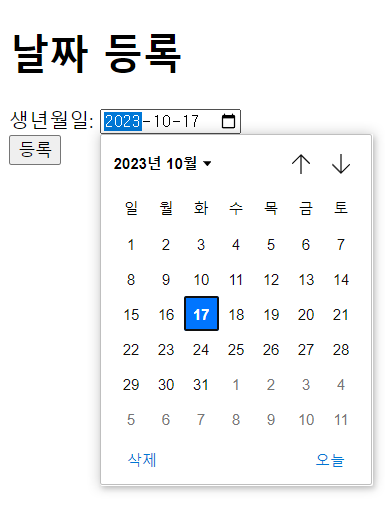
date타입의 input 이렇게 input의 type 속성 값만 바꿔줘도 날짜화면 창을 쉽게 구현할 수 있다.
하지만 이는 브라우저에서 기본으로 제공하는 ui를 이용하는 것이기 때문에, 개발자 개인이 자유롭게 속성들을 변경하기엔 어려움이 있다.
그래서 더 자유로운 스타일로 화면창을 변경하기 위해 , jquery의 datepicker를 사용할 수 있다.
Jquery의 datepicker 이용하기
CDN(Content Delivery Network) 방식으로 라이브러리를 등록해서 사용하였다.
아래의 링크를 헤드부분에 추가하면 된다.
<script src="https://code.jquery.com/jquery-3.6.0.min.js"></script>
<!-- jQuery CDN으로 등록 -->
<link rel="stylesheet" href="https://code.jquery.com/ui/1.13.2/themes/base/jquery-ui.css">
<link rel="stylesheet" href="//code.jquery.com/ui/1.13.2/themes/base/jquery-ui.css">
<script src="https://code.jquery.com/ui/1.13.2/jquery-ui.js"></script>
<!-- jQuery UI CDN으로 등록 -->
<script>
$(function(){
var now = new Date();
var toDayYear = now.getFullYear();
var yearRange = (toDayYear - 100) +":" + toDayYear ;
$("#birth").datepicker({
changeMonth: true,
changeYear: true,
maxDate : new Date(),
yearRange : yearRange,
dateFormat: "yy-mm-dd",
dayNamesMin: [ "일", "월", "화", "수", "목", "금", "토" ],
monthNamesShort: [ "1월", "2월", "3월", "4월", "5월", "6월", "7월", "8월", "9월", "10월", "11월", "12월" ],
});
});
</script>
datepicker를 사용하고자 하는 id를 선택자로 입력해서 넣어주면 된다. 날짜를 입력하는 input태그의 id가 birth였으므로
#birth를 입력해주었다. 그리고 date로 바꿨던 input type을 text로 바꿔주어야 한다.
위의 코드를 입력후 실행하면, jquery UI의 datepicker를 이용할 수 있다.
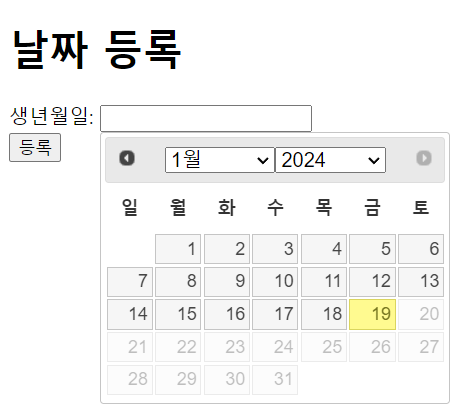
datepicker 화면
datepicker의 api 참조를 위해 해당 사이트 링크를 남긴다.
'자바 초보개발 > JSP-Servlet' 카테고리의 다른 글
2차 프로젝트 - 서블릿을 통한 웹페이지 서버, jsp로 페이지 구현 (2) 2024.02.13 다른 jsp파일을 현재 jsp파일 페이지에 불러오기 - include (0) 2024.01.17 [오류] For input String : "null" 와 Missing end tag for "c : out" (0) 2024.01.08 Servlet을 통한 MVC 모델 구현 개인정리 (1) 2024.01.04 JSP/Servlet에서의 파일 업로드 (0) 2023.12.26